

اخیراً مشاهده شده
متأسفیم! هیچ موردی با انتخاب شما مطابقت ندارد :(
پرطرفدار
متأسفیم! هیچ موردی با انتخاب شما مطابقت ندارد :(
پیشنهادها
متأسفیم! هیچ موردی با انتخاب شما مطابقت ندارد :(

متأسفیم! هیچ موردی با انتخاب شما مطابقت ندارد :(
متأسفیم! هیچ موردی با انتخاب شما مطابقت ندارد :(
متأسفیم! هیچ موردی با انتخاب شما مطابقت ندارد :(
متأسفیم! هیچ موردی با انتخاب شما مطابقت ندارد :(
متأسفیم! هیچ موردی با انتخاب شما مطابقت ندارد :(


 Japan
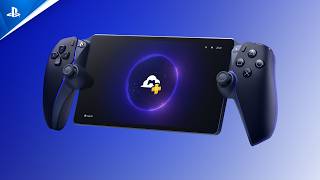
PlayStation Portal Remote Player lets you enjoy compatible PS5 and PS4 games through a dedicated handheld device, featuring an 8-inch Full HD LCD touchscreen, DualSense wireless controller functions, and support for Remote Play and cloud streaming.
Connect to your PS5 console over Wi-Fi to play compatible games installed on your console without using a television. The device also supports cloud streaming for select PS5 games with a PlayStation Plus Premium membership, allowing you to play eligible titles directly through the device without connecting to a PS5 console.
𝗛𝗮𝗻𝗱𝗵𝗲𝗹𝗱 𝗣𝗦𝟱 𝗥𝗲𝗺𝗼𝘁𝗲 𝗣𝗹𝗮𝘆
Stream compatible games installed on your PS5 console over Wi-Fi and continue playing without needing to use the television connected to your console. A PS5 console and PlayStation account are required for Remote Play.
𝗘𝗶𝗴𝗵𝘁-𝗜𝗻𝗰𝗵 𝗙𝘂𝗹𝗹 𝗛𝗗 𝗧𝗼𝘂𝗰𝗵𝘀𝗰𝗿𝗲𝗲𝗻
Enjoy games on an 8-inch LCD touchscreen with a 1920 x 1080 Full HD resolution and gameplay support of up to 60 frames per second.
𝗗𝘂𝗮𝗹𝗦𝗲𝗻𝘀𝗲 𝗪𝗶𝗿𝗲𝗹𝗲𝘀𝘀 𝗖𝗼𝗻𝘁𝗿𝗼𝗹𝗹𝗲𝗿 𝗙𝗲𝗮𝘁𝘂𝗿𝗲𝘀
Experience supported games with built-in controls that incorporate DualSense features, including haptic feedback and adaptive triggers. These functions are available in games that support them.
𝗖𝗹𝗼𝘂𝗱 𝗦𝘁𝗿𝗲𝗮𝗺𝗶𝗻𝗴 𝗦𝘂𝗽𝗽𝗼𝗿𝘁
Stream selected PS5 games directly to the device through PlayStation Plus Premium. Eligible games include selected titles from the Game Catalog, Classics Catalog, and supported digital games from your library. A compatible subscription and supported region are required.
𝗣𝗹𝗮𝘆𝗦𝘁𝗮𝘁𝗶𝗼𝗻 𝗟𝗶𝗻𝗸 𝗮𝗻𝗱 𝟯𝗗 𝗔𝘂𝗱𝗶𝗼
Experience supported 3D Audio content using compatible audio devices. The device supports PlayStation Link wireless audio products and wired headsets connected through its 3.5mm audio jack. Built-in stereo speakers are also available.
𝗪𝗶-𝗙𝗶 𝗖𝗼𝗻𝗻𝗲𝗰𝘁𝗶𝘃𝗶𝘁𝘆
Use the device with a broadband Wi-Fi connection. PlayStation recommends a minimum connection speed of 5Mbps, with 15Mbps recommended for a better gameplay experience. Network quality and performance may vary depending on the connection.
𝗤: Does the PlayStation Portal Remote Player work without a PS5 console?
𝗔: Remote Play requires a PS5 console. However, supported cloud-streaming games can be played directly on the device with a PlayStation Plus Premium membership, without connecting to a PS5 console.
𝗤: Can I play PS4 games on the PlayStation Portal Remote Player?
𝗔: Yes. You can stream compatible PS4 games installed on your PS5 console through Remote Play.
𝗤: Does the PlayStation Portal Remote Player require a PlayStation Plus membership?
𝗔: A PlayStation Plus membership is not required for Remote Play. However, cloud streaming requires an active PlayStation Plus Premium membership and access to eligible games.
𝗤: Can I download games directly onto the PlayStation Portal Remote Player?
𝗔: No. The device streams compatible games through Remote Play or cloud streaming rather than installing and running games locally.
𝗤: What internet speed is recommended for the PlayStation Portal Remote Player?
𝗔: A broadband Wi-Fi connection of at least 5Mbps is required, while 15Mbps or higher is recommended for a better experience.
𝗤: Does the PlayStation Portal Remote Player support wireless headphones?
𝗔: It supports compatible PlayStation Link wireless audio devices. Wired headsets can also be connected through the 3.5mm audio jack.

به جمع گیمرهای ما بپیوندید و هیچ پیشنهاد ویژهای را از دست ندهید.
۱-۲ ایمیل در هفته


